Tech600Pro / Tech550Pro Wi-Fi Configuration
April 17, 2026
This bulletin will guide the user through the configuration process of the Wi-Fi connection to receive updates wirelessly on your Bartec USA® Tech600Pro and Tech550Pro.
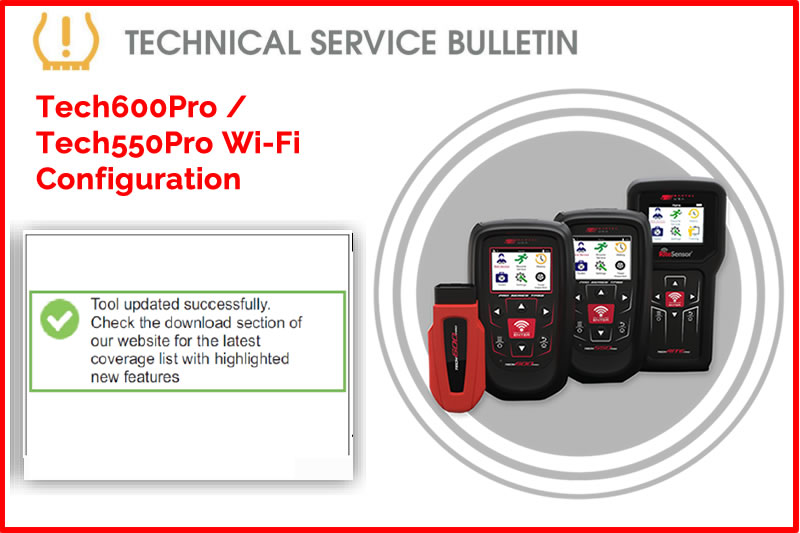
*Tool must be connected to a secure network (i.e., the network must require a Wi-Fi password).
Note: Once connected to the secure network, the tool will give you the option to check for an update. If you select cancel, you will have the option to manually check for updates under Settings. Updates can take up to 20 minutes. For best performance, ensure the tool is near the Wi-Fi hub. If your tool does not see the desired network or fails to connect, ensure you have no obstructions (i.e. walls, doors, etc.) and move closer to the Wi-Fi hub.
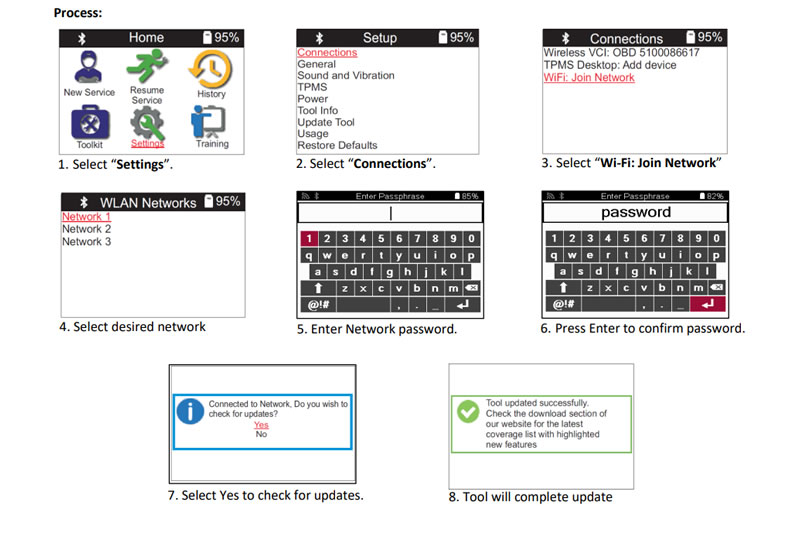
Find the Technical Service Bulletin at https://www.bartecusa.com/tpms-technical-service-bulletins.
Need help getting a Certificate Bundle? E-mail our sales team at sales@bartecusa.com, or call [855]877-9732. Need help updating your Bartec TPMS Tool? E-mail our Tech Support Team at help@bartecusa.com, or call [866]407-8767.
#Tech600Pro #Bartec365 #TPMS #TPMSTools #TPMSSensors #RiteSensor #TPMSSoftware #TPMSSupport #BartecTPMS #TheTrustedBrand
Other Articles
Three Weeks To Go Until SEMA 2026 & We Are Getting Closer
October 14, 2026
Discover What Is New With TPMS At The Sema Show 2026
October 13, 2026
Oktoberfest With Bartec TPMS At The SEMA Show 2026
October 12, 2026
Bartec TPMS To Highlight TPMS Diagnostics At 2026 SEMA Show
October 6, 2026
New TPMS Tool Update Technology At The SEMA Show 2026
October 5, 2026
One Month To Go Until The SEMA Show 2026
October 3, 2026
Bartec TPMS Heads to SEMA Show 2026
October 2, 2026
Take Tire Inspections To The Next Level With The Tread-Rite Tool
September 24, 2026
Three Months Until The SEMA Show 2026 In Las Vegas
August 3, 2026
We Are Excited To Welcome Lindsay Stead To Team Bartec
July 23, 2026
 Bartec USA LLC